Any app, any text box

Hold the key to see what happens to a real ramble.

I think we should move the meeting to Friday at 3 pm, and also can you send me the report by end of day?

Word for word what the model wrote.

Your mouth is faster than your fingers.

Hold a key, talk the way you talk, let go. Clean text lands wherever your cursor is. It runs on your Mac, free, with no word limit.

Apple silicon · macOS 14 or later

Same words. Scroll to clean them.

This is what you actually said.

Ramble. It keeps the point.

It doesn’t just write down the sounds you made. Change your mind mid-sentence and it goes with the last thing you said. Count things out loud and you get a list. Say “best regards” and you get an email.

You said

tell rahul the deploy is at nine no wait ten thirty and he should ping me on slack not email

It wrote

Tell Rahul the deploy is at ten thirty and he should ping me on Slack, not email.

Real output from Ramblebee’s own cleanup model, trained for this one job, running on an M1 Pro MacBook. On its 8 standard test sentences it took about 0.3 seconds each.

Typing is the slow part.

You already know what you want to say. This is the same paragraph at both speeds, in real time.

Typing40 words a minute0
Talking150 words a minute0

Typical rates, and yours will differ. The app’s Home screen shows your own pace. On phones, a Stanford study measured speech at about 3× the speed of a keyboard.

If you can type there, you can talk there.

No plugins and no copying and pasting. It writes where your cursor already is, and lays things out to suit: a greeting and sign-off in an email, a plain line in a chat.

Illustrations of each app. The words being typed are real output from our model. Names and logos belong to their owners.

Your words, your call

You decide where your words go.

Private on your Mac by default, or a cloud model with your own key if that suits you better. Either way, nothing goes through us, because we don’t run a server.

Nothing leaves. That’s the default.

Speech recognition and cleanup both run on your Mac. Want proof? Turn off your Wi-Fi and keep talking.

  • Free, with no word limit
  • Works with no internet at all
  • Your audio is never saved

It goes online once to download its models, about 1.6 GB.

Your voice is understood right here. Nothing leaves your Mac.

  • No account
  • No analytics in the app
  • History is off until you turn it on
  • Password fields are never read or typed into

Premium · Command Mode

Hold a different key. Tell it what to do.

Select some text and say what you want done to it. With nothing selected, it can change what you just dictated, answer the conversation in the window, or write something new at your cursor. Ask it a question and the answer comes up in a card, to read, copy or insert.

Hold right ⌘ and say
Your selected text

Hey team, so I just wanted to quickly let everyone know that the release is probably going to move to Friday, because QA found two bugs that we really need to fix first, and I will send out the notes tomorrow morning once we know more.

Word for word what the local model wrote, running on an M1 Pro MacBook in under a second.

Premium · Meeting notes Beta

All the notes. No bot at the table.

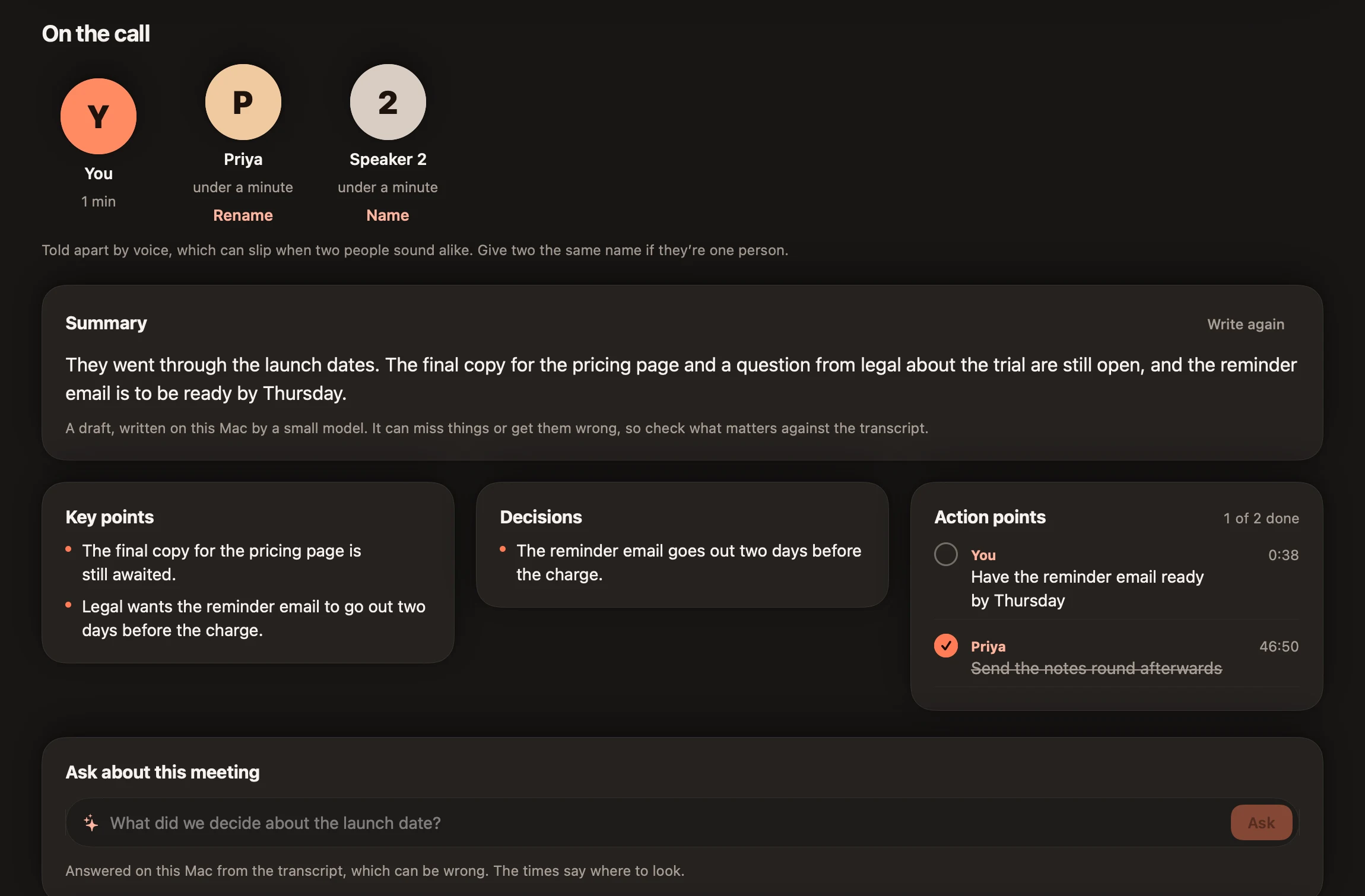
When a call starts, it asks if you’d like notes. It hears your microphone and your Mac’s sound, so nobody joins the call, and it tells the people on the call apart by voice, so you can put names to them. A dot in the pill shows it’s listening. It stays light on your Mac during the call, and writes everything up once the call ends. It’s in beta: it works, and we’re still improving it.

A meeting in the app: who was on the call, a summary, key points, a decision, action points with owners and one ticked off, and a box to ask about the meeting.
The real app, with a sample meeting.

On the call

  • YYou
  • PPriya
  • 2Speaker 2

Summary

They went through the launch dates. The final copy for the pricing page and a question from legal about the trial are still open, and the reminder email is to be ready by Thursday.

Key points

  • The final copy for the pricing page is still awaited.
  • Legal wants the reminder email to go out two days before the charge.

Decisions

  • The reminder email goes out two days before the charge.

Action points 1 of 2 done

  • You Have the reminder email ready by Thursday
  • Priya Send the notes round afterwards

Transcript

You 0:04
Thanks for joining. I wanted to go through the launch dates before the end of the week.
Priya 0:12
Sure. We’re still waiting on the final copy for the pricing page, and legal has one more question about the trial.
You 0:24
What’s the question?
Speaker 2 0:28
They want the reminder email to go out two days before the charge. Can your side send that?
You 0:38
Yes, I can take that. Let’s aim to have it ready by Thursday.

A sample meeting, laid out as the app shows it.

Notes in the shape of the meeting

A summary, key points, decisions, and action points with who said they’d do them and when, plus a title. Stand-ups, one-on-ones and interviews get their own layout. It’s a draft from a model on your Mac, so check what matters against the transcript.

Ask what was said

Type a question about the meeting and get the answer from the transcript, with the time to look at. When the transcript doesn’t say, neither does it.

Teams, Zoom, FaceTime and more

It notices calls in Teams, Zoom, Webex, Slack, FaceTime and Discord, and Google Meet, Whereby or Jitsi in your browser. Any other app that keeps your microphone for 45 seconds counts too. Notes stop when the call does.

English and Hindi, in one transcript

Meetings that mix English and Hindi come out in Roman letters, so the whole transcript stays readable and searchable.

The small things that make you keep it.

It learns your words

Fix a name after dictating and it offers to remember it.

Snippets

Say a short cue, get the long text.

Never lose your words

Nowhere to type? They wait in a card, ready to copy.

Notes that float above your work

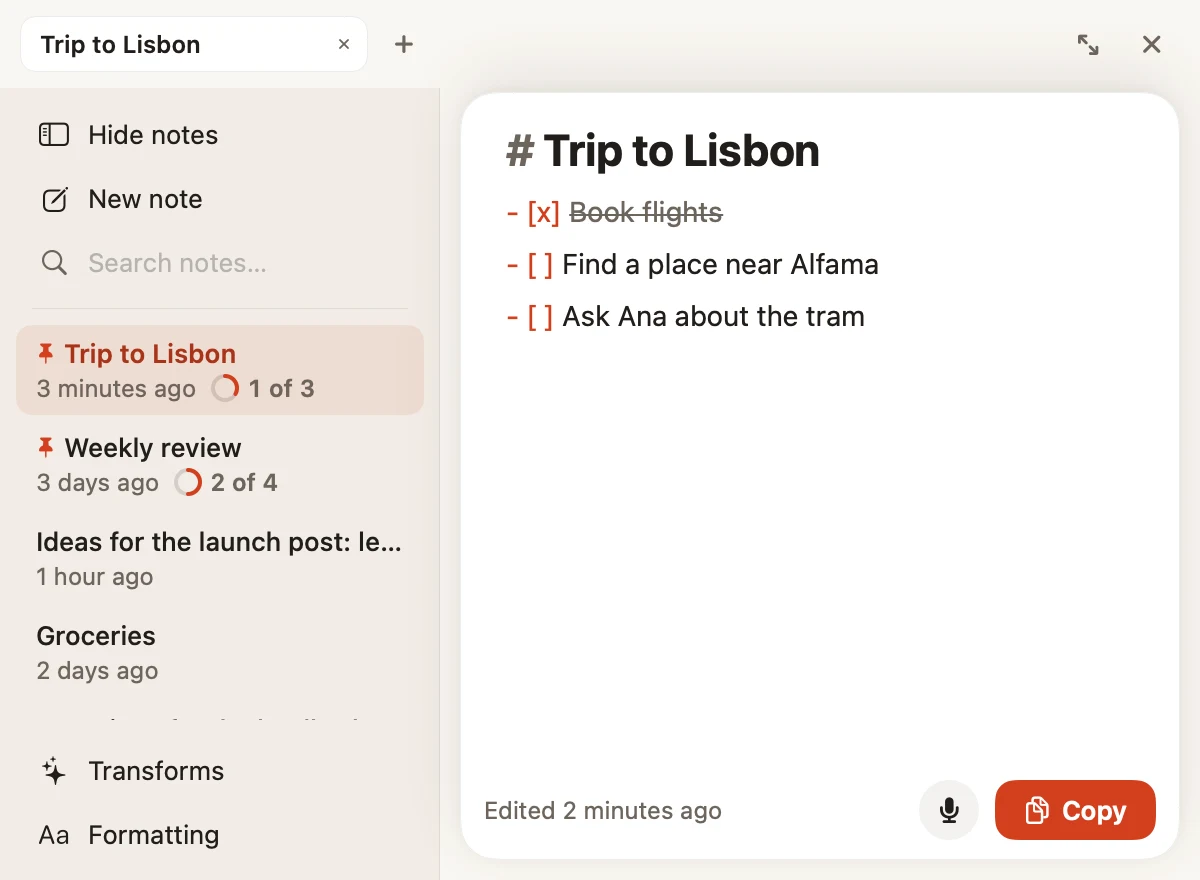
Type or talk, in Markdown, with one shortcut.

The Notes window with a to-do list.

A voice for each app

Natural, concise, professional or casual, set per app.

Hands-free

Tap twice and keep talking, with no key to hold down.

Premium

Knows your code

Say a file or function name and it’s spelled the way it is in your project.

Take it back

Say “scratch that” to drop a sentence. Cancelled by mistake? Undo brings it back.

See how far you’ve come

Words, time saved against typing, your speaking pace and your streak. Share a card of it, made on your Mac, with none of your words on it.

Fits right in

Spaces, capitals and full stops fit the text around your cursor.

Your clipboard, untouched

It pastes your words, then puts back whatever you’d copied.

Talking stays free.

It runs on your Mac, so your words cost us nothing. That’s why there’s no word limit. Premium is for people who want it to do more.

Free

$0 for good

No card and no account.

  • Unlimited dictation, with no word limit
  • Speech and cleanup that run on your Mac
  • Or your own API keys, if you prefer
  • No account
  • Your dictionary, snippets and history
  • Notes, with Markdown and dictation
  • Built-in writing styles

Premium

$4 a month

Stop whenever you like.

7-day trial with a card. Charged when it ends unless you cancel first. See refunds.

  • Everything in Free
  • Command Mode: edit, reply and write by voice
  • Meeting notes with summary and action points (beta)
  • Your own commands and writing styles
  • File and code names from your projects
  • Transforms in Notes
  • New features reach Premium first

Good questions.

Does anything I say leave my Mac?

Not by default. “Keep everything on this Mac” starts switched on, and it blocks every cloud request. If you add your own API key and choose a cloud engine, what you say goes straight from your Mac to that provider, under their terms, and the app shows you that it’s doing so. It never goes through us, because we don’t run a server.

Can I use my own API keys?

Yes, if you want a cloud model. Add a key from OpenAI, Groq, Gemini, Anthropic or DeepSeek, or point it at any OpenAI-compatible server, such as Ollama or OpenRouter. Speech and cleanup can each use a different one, and you can choose per app. Keys stay in your Mac’s Keychain, and the provider bills you directly.

Does it need the internet?

Only to download its models. Dictation needs about 1.6 GB, once. Command Mode and meeting notes use a larger model, about 2.5 GB more, if you want them. After that, turn off your Wi-Fi and it carries on working.

Which models does it use?

Open models, in a pipeline of our own. Express, Universal or Lite hear you, and Standard or Advanced clean up. Standard is our own model, trained for dictation. The others are published by NVIDIA, OpenAI and the Qwen team, and each one is credited with its licence in the app and on our Credits page. You can see each model’s size, and remove it, in Settings › Storage.

Which Macs does it run on?

Macs with Apple silicon (M1 or later) running macOS 14 or newer. Meeting notes need macOS 14.2 or newer. Intel Macs, Windows and phones aren’t supported today.

Which languages does it understand?

Dictation is built for English. Meeting notes handle English, and also English mixed with Hindi, which is written in Roman letters.

Which apps does it work in?

Anywhere your cursor can type: mail, chat, documents, code editors, terminals and browsers. If a field can’t take the text, your words stay on screen in a card, ready to copy, so you never lose them. Password fields are never read or typed into.

Why does it ask for Accessibility permission?

macOS requires it for an app to type into other apps and to notice your shortcut. The microphone permission is for hearing you. Your audio is never saved.

Is the free version really unlimited?

Yes. Free dictation has no word limit, no time limit and no account, because it runs on your own Mac and costs us nothing per word.

How does the Premium trial work?

You get 7 days of Premium with a card on file. It’s charged when the 7 days end, unless you cancel first. If you never upgrade, free dictation keeps working.

What does “beta” mean for meeting notes?

They work, and we’re still improving them with every release, so expect the odd rough edge. Keep your own notes for anything critical until you trust them.

Do meeting notes join my call as a bot?

No. They listen to your microphone and your Mac’s sound, so nobody joins the call. Summaries are drafts from a small model on your Mac, so check what matters against the transcript. Recording laws differ by place, so tell people you’re taking notes.
Go on.
Say something.

Apple silicon · macOS 14 or later. On your phone? We’ll email you the link for your Mac.

Be first to try Ramblebee.

We’re finishing the signed Mac download. Leave your email and we’ll send you the link when it’s ready, so you can open it on your Mac.

Apple silicon · macOS 14 or later. We’ll only use your email for this.